
Security & recovery
SQL Server ransomware defense: hardening, detection, and recoverable backups
A practical SQL Server ransomware defense plan covering attack paths, useful detection, immutable backups, and clean recovery.
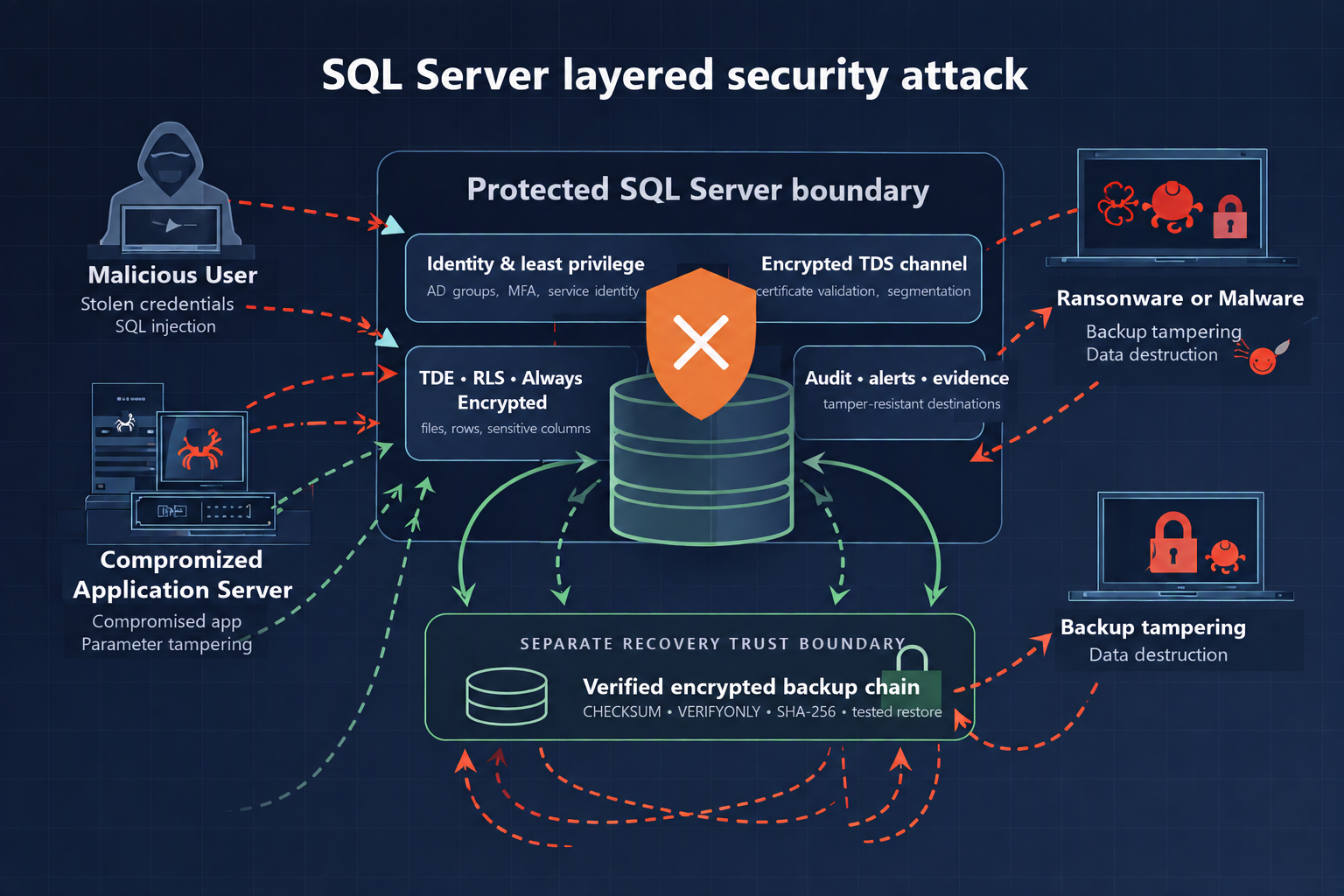
Ransomware resilience is not measured by whether a backup job finished last night. It is measured by whether the business can restore clean data after production identities, servers, and reachable storage have been compromised. This guide focuses on that harder test: reduce the routes into SQL Server, spot the actions that precede impact, and keep at least one recovery copy outside the attacker’s control.
Executive summary
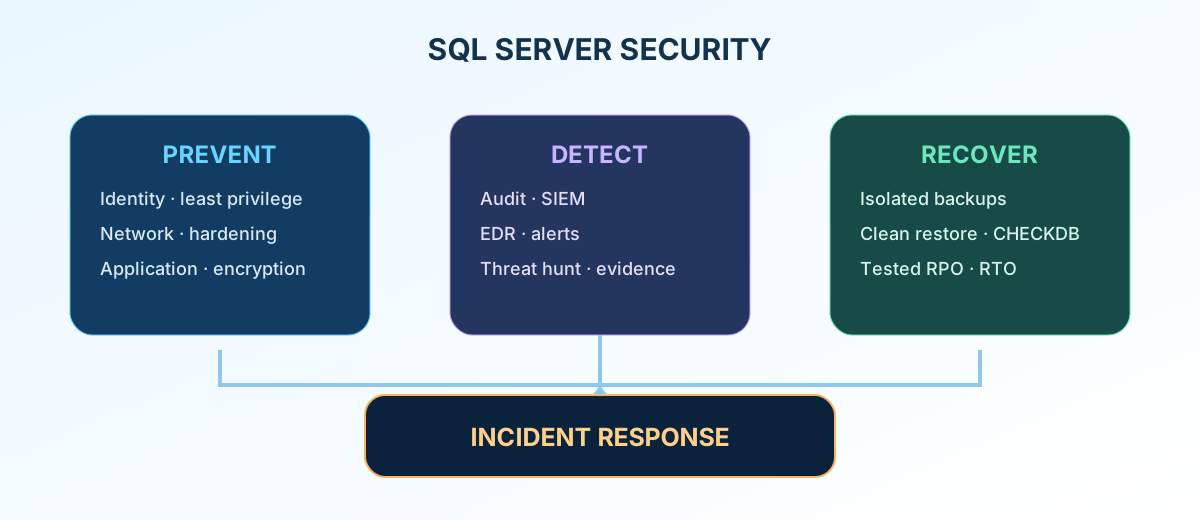
If you have only a few minutes, start with four decisions:
- Remove direct internet access to SQL Server and restrict inbound connections to known application and administration networks.
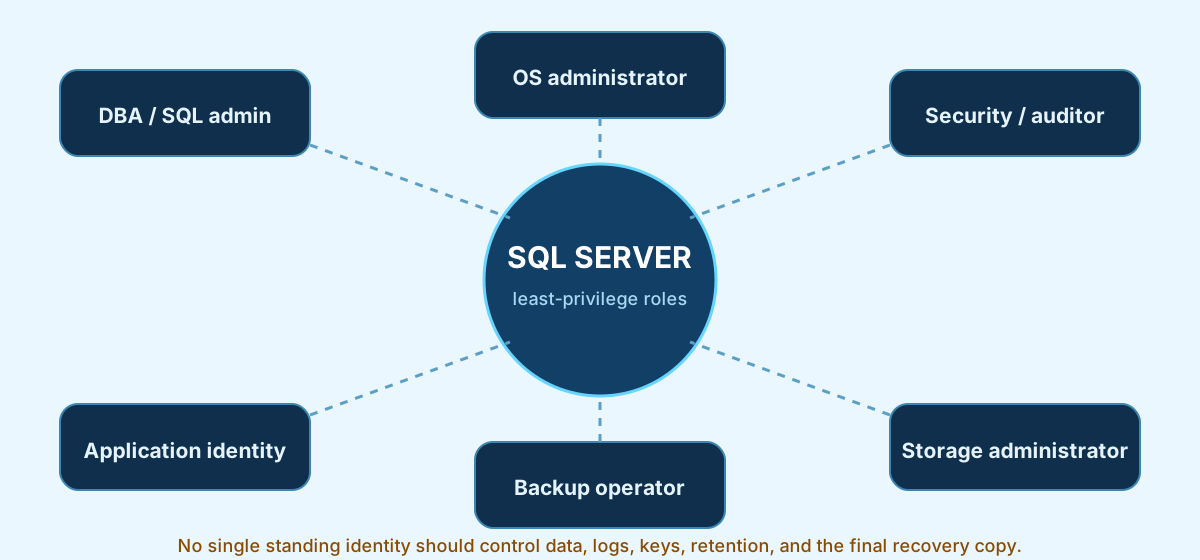
- Separate database, operating-system, audit, backup, and storage privileges. One stolen administrator account must not control all five.
- Alert on new privileged accounts, dangerous configuration changes, executable SQL Agent steps, backup deletion, and storage-retention changes.
- Keep an offline or immutable backup under separate credentials, then restore it on a clean host and measure the result against the business recovery objective.
This is an on-premises and infrastructure-as-a-service SQL Server guide. It does not replace application code review, endpoint and email security, identity-provider hardening, legal notification advice, or the platform-specific controls for managed database services.
Why this matters to the business
The September 2026 disruption at the Nepal Stock Exchange (NEPSE) is a useful reminder that a technology incident can quickly become a market, customer, and reputation problem. Restoring service matters, but availability is only one part of the outcome. The response team must also establish whether data was exported, whether records were changed, and whether the recovered environment can still be trusted.
That distinction changes the backup conversation. A local .bak file may help with an accidental deletion. It is not a resilient recovery copy if the compromised SQL Server service account, domain administrator, backup agent, or storage administrator can delete it. Ransomware operators target recovery systems because removing the alternative to payment increases their leverage.
What ransomware looks like around SQL Server
The database is rarely the first machine compromised. A common route starts with a stolen remote-access credential, an exposed service, a vulnerable edge device, or a compromised application. From there, the attacker looks for identities with broader rights, management tools that run as SYSTEM, shared service accounts, and storage reachable from production.
Once the attacker reaches SQL Server, the work may be less dramatic than file encryption. A privileged login can create another sysadmin, enable xp_cmdshell, alter SQL Agent jobs, query linked servers, or export data with bcp or sqlcmd. A host administrator can stop services, delete .bak, .trn, .mdf, and .ldf files, disable SQL Writer, or remove Volume Shadow Copies. An attacker may also modify msdb backup history or maintenance jobs so the recovery picture shown to the DBA is incomplete or false.
The threat model must include both extortion paths: data theft and service destruction. Encryption at rest does not stop a stolen privileged identity from reading plaintext, and high availability may reproduce a destructive change perfectly on the secondary.
| Attacker objective | SQL Server or host behavior to expect | ATT&CK context |
|---|---|---|
| Keep access | New login or sysadmin, changed sa status, scheduled Agent job, stolen service identity | Valid Accounts (T1078), Account Manipulation (T1098) |
| Execute on the host | xp_cmdshell, PowerShell or CmdExec job steps, OLE Automation, external scripts | Command and Scripting Interpreter (T1059) |
| Steal data | bcp, sqlcmd, bulk queries, linked-server pulls, Agent steps writing to a share | Exfiltration (TA0010) |
| Hide activity | Audit disabled, event logs cleared, backup history removed | Impair Defenses (T1562.001) |
| Remove recovery | Backups or snapshots deleted, retention shortened, SQL Writer stopped, VSS removed | Inhibit System Recovery (T1490) |
| Disrupt service | Databases dropped, detached, encrypted, corrupted, or placed offline | Data Encrypted for Impact (T1486), Data Destruction (T1485) |
Treat this as the minimum set of actions your controls should prevent, record, or survive—not as an exhaustive attacker playbook.
Run the baseline before changing production
Start with inventory. Unowned instances, forgotten SQL logins, old linked servers, and undocumented Agent jobs are common because they sit outside the normal change process. The read-only baseline supplied here reports authentication mode, logins, sysadmin membership, sensitive configuration, linked servers, endpoints, audits, encryption, Agent steps, and recent backups.
Run it with VIEW SERVER STATE, VIEW ANY DEFINITION, and read access to msdb. Review the output with the application owner before disabling anything. A setting that looks unnecessary may still support a month-end export or vendor integration; security work that causes an avoidable outage loses support quickly.
SQL Server security baseline
Record the instance, execution date, reviewer, accepted exceptions, and remediation owner with the output.
Download the T-SQL baselineLoading script…Before moving an instance to Windows-only authentication, identify every connection still using SQL authentication; changing the mode first can cause an outage. Before enforcing certificate validation or strict encryption, inventory drivers, endpoint names, and connection strings, then test from each application and administration network.
Prevent compromise and contain the blast radius
There is no single hardening switch. The useful question is narrower: if this identity or component is compromised, what can it reach next?
How can we secure SQL Server?
Use controls that match the state of the data and the attacker action you need to stop. The edition notes below are a planning guide, not a substitute for checking the exact build: Microsoft expanded several security features through service packs and cumulative updates.
| Feature or layer | What it protects | Version and edition guidance | Important limit |
|---|---|---|---|
| SQL Server Audit | Privilege, configuration, and selected data-access evidence | Server Audit is available across current editions; database-level Audit is available across editions from SQL Server 2016 SP1 | The target must be protected from the monitored host, and high-volume actions require capacity testing |
| TDE | Database, log, tempdb, and eligible backup files at rest | SQL Server 2008+; Enterprise on older releases; SQL Server 2019 Standard from CU5; Standard and Enterprise in current 2022/2025 matrices | A privileged session still reads plaintext; recovery requires the certificate and private key |
| Backup encryption | Portable full, differential, and log backup files | SQL Server 2014+; supported in Standard and Enterprise on current releases | Keys stored beside the backup remove the separation you need |
| Always Encrypted | Selected columns that the Database Engine should not see in plaintext | SQL Server 2016+; available across current editions | Requires supported drivers plus query and application compatibility testing |
| Row-Level Security | Which rows a session may see | SQL Server 2016+; available across current editions | Policy design and execution context must be tested; privileged access still needs governance |
| Dynamic Data Masking | Accidental display to non-privileged users | SQL Server 2016+; available across current editions | Masking is not encryption and does not stop a privileged user |
| Basic Availability Groups | Availability for one database per group | SQL Server 2016+ Standard; Enterprise supports broader Always On designs | Availability does not protect against deletion or corruption replicated to the secondary |
What can be improved in the existing system now?
Most organizations do not need to redesign the application before reducing ransomware risk. Start with controls around the current database contract. “No code change” still means change control, client testing, a maintenance window, and a rollback plan.
| Improvement | Typical change level | What can be achieved without changing application code |
|---|---|---|
| Patch SQL Server, Windows, tools, and drivers | Low; a restart may be required | Removes known vulnerabilities while keeping tables and queries unchanged |
| Remove internet exposure and tighten firewall paths | Low to medium network change | Limits who can reach SQL Server; connection endpoints and ports must be verified |
| Disable unused features, protocols, jobs, and linked servers | Low when dependencies are known | Removes execution and lateral-movement paths without changing business logic |
Review sysadmin, db_owner, service accounts, and file ACLs | Low to medium operational change | Reduces standing privilege while preserving approved application grants |
| Enforce TLS with a trusted certificate | Low to medium | Protects traffic without code changes when existing drivers and names are compatible |
| Send Audit and host telemetry to protected storage | Low to medium | Adds durable evidence and alerts; audit volume and retention still need testing |
| Encrypt backups and create an isolated or immutable copy | Low to medium recovery change | Preserves a recovery copy without changing the live application |
| Enable TDE after securing certificate recovery | Medium database and operations change | Encrypts data and log files transparently to the application, with key and CPU responsibilities |
| Run an isolated restore exercise | Operational change | Proves the backup chain, keys, integrity, dependencies, and actual RPO/RTO |
| Adopt Always Encrypted or complex Row-Level Security | Medium to high | Treat as an application project because drivers, queries, and behavior may change |
Cut the exposed surface
Do not publish SQL Server directly to the internet. Use a static port where practical, restrict it at the firewall to approved sources, and disable SQL Browser when discovery is not required. Separate application, database, administration, and backup paths. Outbound controls matter too: database hosts should not have unrestricted access to shares or the internet simply because an administrator may need it occasionally.
Patch the dependency chain, not only the engine: Windows, SQL Server updates, drivers, SSMS, backup software, monitoring agents, and remote-management tools. Third-party agents deserve scrutiny because many run with local-system privileges.
Review features that turn a database compromise into host execution or lateral movement: xp_cmdshell, OLE Automation, CLR, external scripts, Ad Hoc Distributed Queries, linked servers, Agent proxies, replication, PolyBase, and unused endpoints. Disable what has no named owner and documented dependency.
Make identity boundaries real
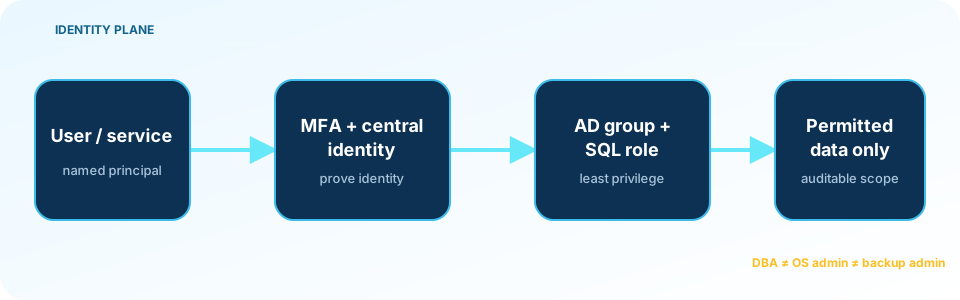
Prefer Windows authentication and group-based access. Use named identities, require MFA on the administrative path, and avoid shared DBA accounts. If SQL authentication remains necessary, enforce password policy, restrict source networks, alert on use, and protect the secret in a vault. SQL Server does not provide a general-purpose connection throttle; source restriction and identity controls are more dependable than hoping repeated attempts will stop themselves.
Run the Database Engine and SQL Agent under distinct, minimally scoped service accounts. A group Managed Service Account can reduce password-handling risk where supported. Neither account should be a local administrator. Grant file permissions by purpose: the engine needs its data and log paths, the backup process needs its target, and interactive users do not need write access to either.
Keep domain, Windows, SQL, audit, backup, storage, and application administration separate where feasible. Ask one practical question: can any one identity read all sensitive data, change the audit trail, run operating-system commands, and delete every recovery copy? If so, the boundary exists on paper only.
Secure the application and network path
Use parameterized commands and review stored procedures that build dynamic SQL. sp_executesql is safe only when untrusted values are passed as parameters. Give each workload a dedicated identity with the specific permissions it needs. Module signing is often better than granting an application db_owner for one privileged operation.
Encrypt connections and validate the server certificate. Encrypt=True;TrustServerCertificate=True encrypts traffic but does not verify server identity, so it should not become the permanent configuration. SQL Server 2022 can use TDS 8.0 strict encryption, but every driver and connection path must be tested first.
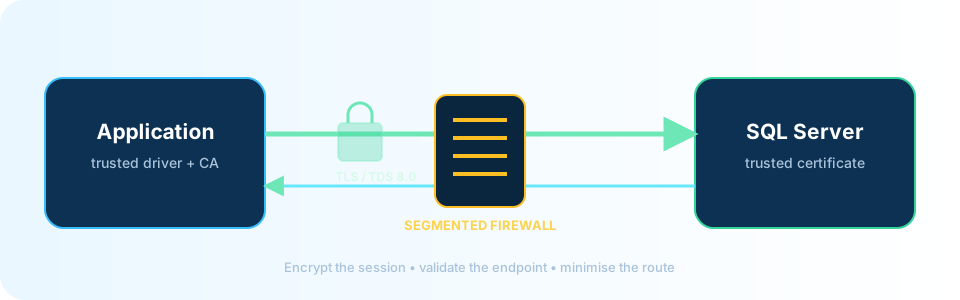
Certificate-validated connection test
This script uses integrated authentication, Encrypt=True, and TrustServerCertificate=False.
Loading script…Protect data without overstating encryption
TDE protects database and log files, tempdb once any database uses TDE, and eligible backups from offline theft. It does not stop a privileged query. Always Encrypted can keep selected values hidden from the Database Engine, but it brings driver, query, and key-management constraints. Dynamic Data Masking reduces accidental display; it is not an encryption boundary.
If privileged database users should not be able to read selected columns, continue with Always Encrypted in SQL Server: a practical guide. It explains the client-side trust boundary, key hierarchy, encryption choices, secure enclaves, and a tested rollout path with working examples.
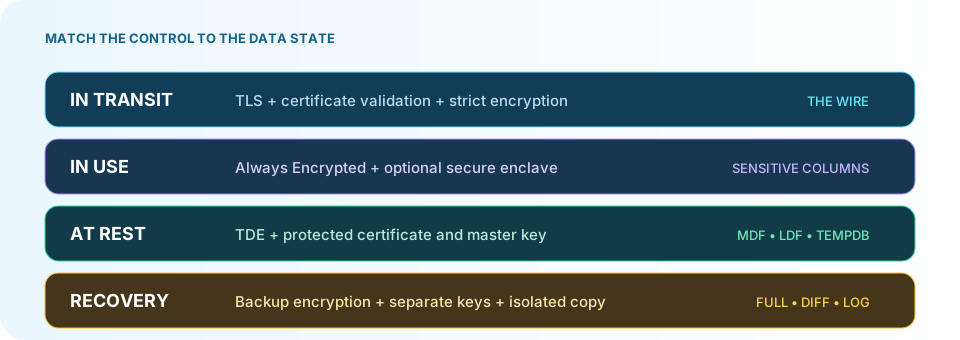
For TDE, create the certificate before enabling encryption and export it with its private key. Store the exported material and password outside the SQL host and outside the backup operator’s normal reach. Then prove the process on another instance. A certificate file nobody has restored is an assumption, not evidence.
Feature availability varies by release and edition. Database-level Audit became available across editions in SQL Server 2016 SP1. TDE support in SQL Server 2019 Standard requires CU5 or later. Check Microsoft’s feature matrix for the exact version, edition, and build. Developer edition has Enterprise features but is not licensed for production.
Build detections an operator can use
“Enable auditing” is not an operating plan. Each alert needs an event source, threshold or comparison, owner, response action, retention period, and test case. Start with events that indicate privilege, execution, defense evasion, or recovery sabotage.
| Signal | Practical source | Starting rule and owner |
|---|---|---|
Login, role, or sa changed | SQL Audit; scheduled principal/role diff | Every unapproved change; DBA and SOC |
| Dangerous feature enabled | Audit configuration-change actions; sys.configurations diff | Every out-of-window change; DBA and SOC |
| Agent job or executable step changed | msdb metadata diff, Agent logs | PowerShell/CmdExec and owner changes; DBA/platform |
| Audit stopped or target changed | Audit state and host file monitoring | Critical on every stop, failure, or path change; SOC |
| Failed login then unusual success | Audit, error log, Windows, identity and network telemetry | Tune by source/account; SOC/identity |
| Backup, VSS, or retention changed | Audit, Agent history, EDR, storage control-plane logs | Critical on deletion or policy reduction; backup/storage |
| Unusual export or egress | Targeted Audit, host process, firewall/DLP logs | Baseline high-value data and destinations; data owner/SOC |
Do not begin by auditing every SELECT. On a busy system, that can create serious I/O, storage growth, and review noise. Audit privileged actions broadly, target a few high-value objects, and measure volume under a representative workload. Keep the destination beyond the SQL host’s ability to rewrite it.
Loading script…Detection watchlist and evidence runner
The watchlist is a snapshot, not a replacement for Audit or a SIEM. The wrapper uses certificate validation and hashes exported evidence.
Download detection T-SQLDownload the evidence runnerEngineer a recovery path production cannot destroy
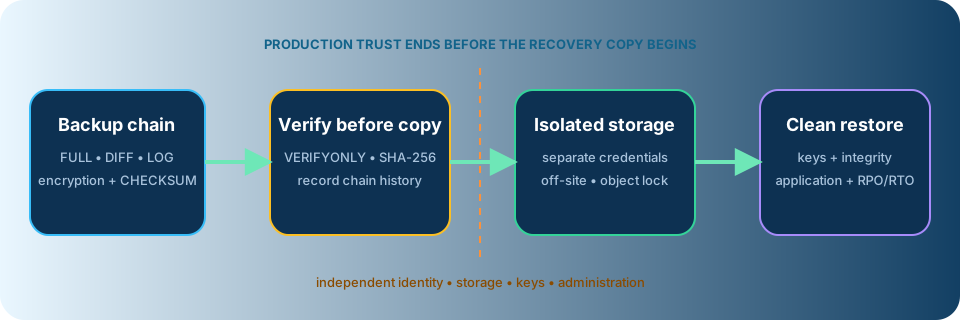
A resilient backup is complete enough to meet the RPO, inaccessible to compromised production identities, and proven by restoration. “Immutable” must be operationally true. If the writing identity can shorten retention, change policy, delete the account, or obtain an override role, the copy is not independent.
Keep one copy under separate credentials and a separate control plane: offline media or object storage with locked retention. Protect TDE certificates, private keys, passwords, application secrets, installation media, license information, and build documentation with the recovery set.
Remember the local destruction chain. The SQL service account often has write access to the backup directory. Maintenance plans may use xp_delete_file. A privileged user can alter jobs or delete msdb history. Host administrators can stop SQL Writer, remove shadow copies, or delete files. None of those actions should reach the final copy.
BACKUP ... WITH CHECKSUM and RESTORE VERIFYONLY are useful media checks, but they do not prove database consistency or application behavior. A meaningful drill uses a separate host, identity, and network:
- Obtain approved clean build media and independently held keys.
- Restore the full, differential, and log chain to the required point. Capture a tail-log backup only when incident procedure makes that safe.
- Run
DBCC CHECKDB; usePHYSICAL_ONLYfor frequent checks only when a scheduled full check still exists. - Resolve file
MOVEpaths, orphaned users, logins, jobs, certificates, and dependencies. TreatWITH REPLACEas a controlled exception. - Validate critical business transactions, rotate exposed credentials and keys, and record elapsed recovery time and the achieved data-loss window.
Compare the measured result with the approved RPO and RTO. If it misses either target, put the gap on the risk register with an owner and date.
A practical 30/60/90-day plan
First 30 days: know what can fail
- Inventory instances, owners, editions, builds, authentication, jobs, links, service accounts, backup destinations, and key locations.
- Remove direct internet exposure and review inbound and outbound firewall paths.
- Confirm that production credentials cannot delete the final recovery copy.
- Run one isolated restore of a critical database and record the result.
- Assign owners for critical alerts and the ransomware response decision chain.
Days 31–60: reduce standing privilege
- Patch the engine, operating system, drivers, and privileged agents.
- Remove unused
sysadmin, local administrator, linked-server mappings, and executable features. - Separate SQL, Windows, backup, audit, and storage administration.
- Validate TLS certificates and client compatibility before enforcement.
- Forward high-value audit, identity, EDR, Agent, and storage events to protected retention.
Days 61–90: prove and improve
- Exercise high-confidence detections and verify the correct team responds.
- Repeat the restore with the application owner and measure RPO/RTO.
- Test credential and TDE-key recovery without the original SQL host.
- Evaluate TDE, Always Encrypted, row-level security, module signing, and Extended Protection against real requirements.
- Present unresolved gaps as business risks with cost, owner, and due date.
SQL Server ransomware incident response
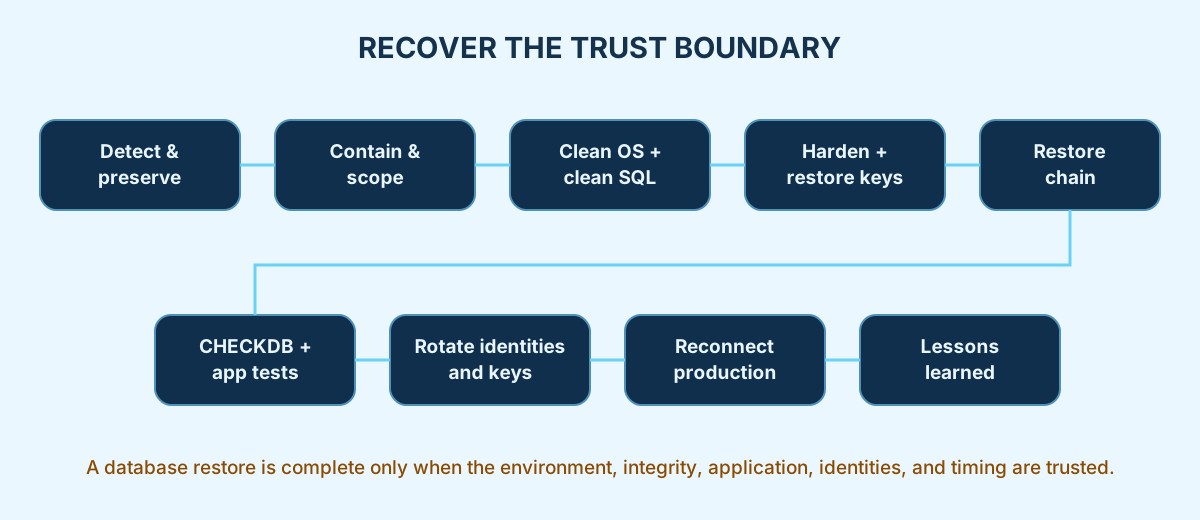
During an incident, speed matters, but uncontrolled action can destroy evidence. Follow the organization’s incident command, legal, privacy, communications, and insurance procedures; the database team should not make notification or ransom decisions alone.
- Preserve evidence. Capture SQL and Agent logs, Audit files, Windows events, EDR telemetry, identity records, backup history, storage events, and volatile evidence as directed. Do not reflexively reboot.
- Contain the reach. Isolate affected hosts, disable confirmed compromised identities, block lateral paths, and protect backup repositories.
- Establish the blast radius. Determine which identities, databases, keys, linked systems, copies, and storage policies were accessed. Investigate exfiltration as well as encryption.
- Rebuild trust. Install the operating system and SQL Server from approved media on a clean boundary.
- Restore and validate. Recover independently held keys and the backup chain, run integrity checks, validate application journeys, rotate credentials, and reconnect in stages.
- Record what changed. Preserve the timeline, actual RPO/RTO, failed controls, notification decisions, and named corrective actions.
Where SQL Optima Backup Manager fits
Disclosure: SQL Optima publishes this article and develops SQL Optima Backup Manager.
SQL Optima Backup Manager supports the recovery layer. It manages full, differential, and log plans; uses compression, CHECKSUM, and optional backup encryption; runs RESTORE VERIFYONLY; calculates SHA-256; and records job history. Approved files can remain local or copy to MinIO, Amazon S3, Azure Blob Storage, or Google Cloud Storage.
It does not prevent ransomware or replace TDE, endpoint protection, identity controls, protected logging, incident response, or an isolated restore. Storage retention and credentials must remain outside the production trust boundary. Transfer integrity is meaningful only when the destination hash is independently calculated or compared after transfer.
Download the current Windows x64 package.
Download integrity
These SHA-256 values apply to the files published with this revision:
28de9a9e7b5ca17f3d8ddfa178403229383964571ea8b880a0e50d056bb423f6  sql-server-security-baseline.sql
47132d052b23f2eaca6bcaaa25ae3c12b6d0c079365efbed637b35b711e3ec91  test-sqlserver-tls.ps1
3ce7386eccd834f2359a01447cfed94ab36b61951b1c9ba6949cf6aa78fc1f51  sql-server-detection-watchlist.sql
e4f1d5a357dd235dd9e3b6ec68d800ef3bf63237d4a012c10ae9bf54f8a61458  invoke-sql-security-review.ps1
References
- CISA #StopRansomware Guide
- MITRE ATT&CK: Data Encrypted for Impact
- MITRE ATT&CK: Inhibit System Recovery
- MITRE ATT&CK: Impair Defenses
- SQL Server security best practices — Microsoft Learn
- SQL Server 2022 editions and features — Microsoft Learn
- SQL Server Audit — Microsoft Learn
- Transparent Data Encryption — Microsoft Learn
BACKUP CERTIFICATE— Microsoft Learn- Always Encrypted — Microsoft Learn
RESTORE VERIFYONLY— Microsoft LearnDBCC CHECKDB— Microsoft Learn- NEPSE ransomware incident — OnlineKhabar
Last content review: 29 September 2026. Validate version, edition, cumulative update, operating system, and driver behavior in a non-production environment before implementation.