
Security & recovery
Always Encrypted in SQL Server: a practical guide
Learn how Always Encrypted keeps sensitive columns out of the database engine, how its keys and client driver work, and what to test before production.
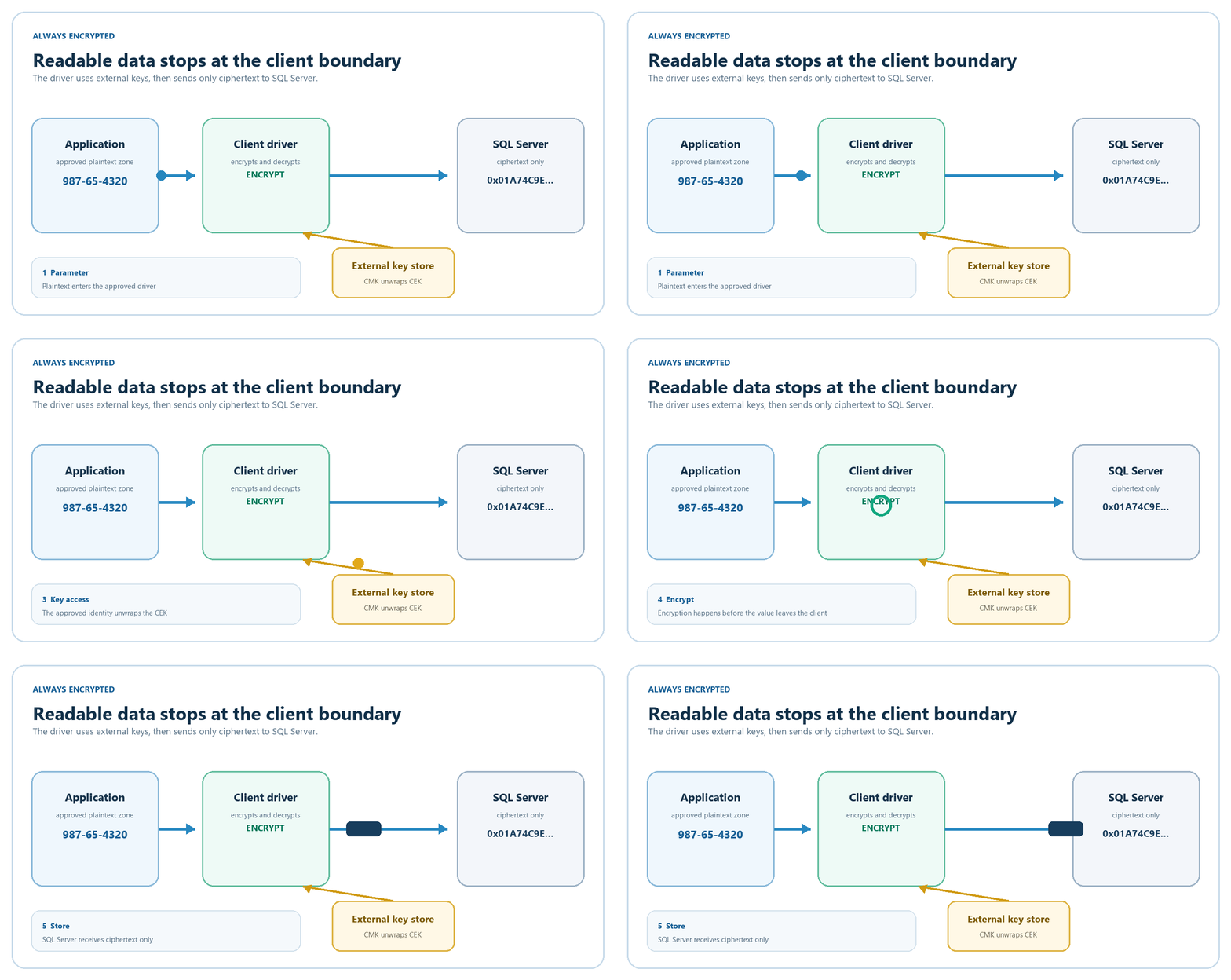
Always Encrypted is for a specific problem: the database must store sensitive values, but the people and systems that operate the database should not automatically be able to read them.
The application driver encrypts selected values before they reach SQL Server. The server stores ciphertext. An approved application sees plaintext only after its driver obtains the key.
The idea in plain English
Imagine a locked envelope moving through a mailroom. The mailroom can store it, route it, and return it, but it cannot open it. The sender and approved recipient hold the key.
SQL Server is the mailroom. An Always Encrypted-aware client driver seals and opens the envelope. The key lives outside the database system.
Without an enabled driver, a query returns encrypted bytes:
-- This connection does not include Column Encryption Setting=enabled.
SELECT SSN, Salary
FROM HR.Employees;
With an approved client, the same query can return readable values. The difference is not the query text. It is whether the client is allowed to reach the key store.
How it differs from other controls
| Control | What it does | Can a privileged query read the value? |
|---|---|---|
| TDE | Encrypts database and log files at rest | Yes |
| DDM | Changes how some results are displayed | Yes; it is not encryption |
| Always Encrypted | Encrypts selected values at the client boundary | Not without key-store access |
| Always Encrypted with secure enclaves | Allows richer work in protected server memory | Only inside the enclave during approved operations |
Use TDE and Always Encrypted together when both risks matter: TDE protects files from offline theft, while Always Encrypted protects selected values from the database tier.
How one value moves through the system
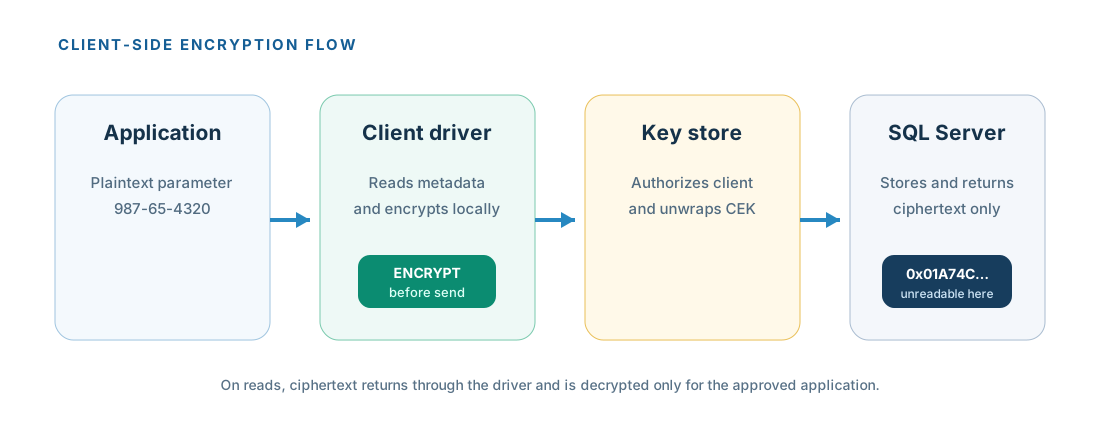
For a parameterized INSERT, the flow is:
- The application sends the statement and parameters through a supported driver.
- The driver asks SQL Server which parameters target encrypted columns.
- SQL Server returns encryption metadata and an encrypted copy of the data key.
- The driver uses the application identity to ask the external key store to unwrap that key.
- The driver encrypts the parameter and sends ciphertext to SQL Server.
- SQL Server stores ciphertext. On a later
SELECT, the driver decrypts the result for the application.
SQL Server knows the schema and key locations, but it does not store the keys in plaintext.
The two-key design
Always Encrypted uses envelope encryption: one key protects the data and another key protects that key.
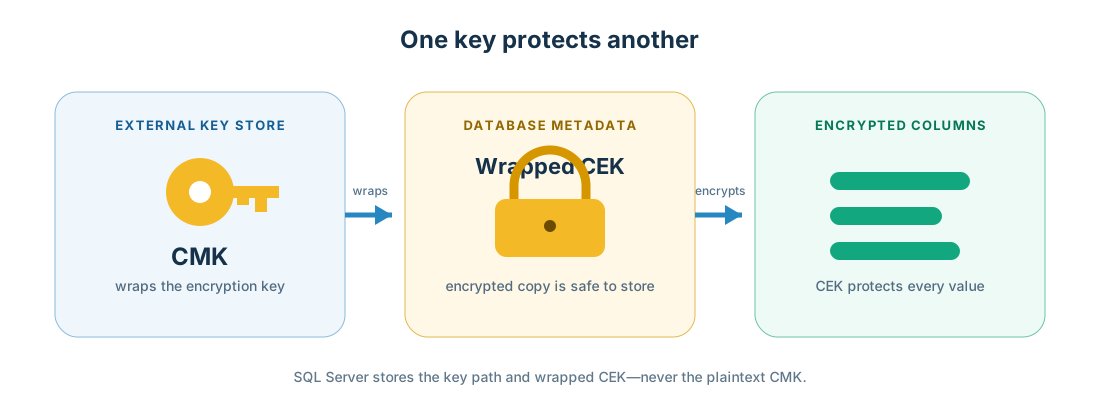
- The CMK protects other keys. Keep it in Azure Key Vault, a Windows certificate store, or a supported hardware security module. The database stores metadata that points to it.
- The CEK encrypts column values. SQL Server stores only a wrapped copy of it.
Column values use AEAD_AES_256_CBC_HMAC_SHA_256. The name describes authenticated encryption built from AES, CBC, and a HMAC. Microsoft documents that Always Encrypted uses FIPS 140-2 validated cryptographic modules.
Encryption adds storage overhead. A four-byte int, for example, becomes 65 encrypted bytes. Measure row width, indexes, memory grants, and network traffic with realistic data.
Build a small example
Use a development database and test key store first. Do not copy production secrets into a lab or run key-provisioning tools on the SQL Server host.
1. Create the key metadata and table
This T-SQL is a template. The key path and encrypted value are placeholders; create the real wrapped value with SQL Server Management Studio or the SqlServer PowerShell module.
CREATE SCHEMA HR;
GO

CREATE COLUMN MASTER KEY [CMK_HR]
WITH
(
    KEY_STORE_PROVIDER_NAME = 'AZURE_KEY_VAULT',
    KEY_PATH = 'https://your-vault.vault.azure.net/keys/hr-cmk/key-version'
);
GO

CREATE COLUMN ENCRYPTION KEY [CEK_HR]
WITH VALUES
(
    COLUMN_MASTER_KEY = [CMK_HR],
    ALGORITHM = 'RSA_OAEP',
    ENCRYPTED_VALUE = 0x... -- generated outside SQL Server
);
GO

CREATE TABLE HR.Employees
(
    EmployeeID int IDENTITY(1,1) NOT NULL
        CONSTRAINT PK_HR_Employees PRIMARY KEY,
    SSN char(11) COLLATE Latin1_General_BIN2 NOT NULL
        ENCRYPTED WITH
        (
            COLUMN_ENCRYPTION_KEY = CEK_HR,
            ENCRYPTION_TYPE = DETERMINISTIC,
            ALGORITHM = 'AEAD_AES_256_CBC_HMAC_SHA_256'
        ),
    FirstName nvarchar(50) NOT NULL,
    LastName nvarchar(50) NOT NULL,
    Salary money NOT NULL
        ENCRYPTED WITH
        (
            COLUMN_ENCRYPTION_KEY = CEK_HR,
            ENCRYPTION_TYPE = RANDOMIZED,
            ALGORITHM = 'AEAD_AES_256_CBC_HMAC_SHA_256'
        )
);
GO
Review every placeholder. Encrypted character columns require a supported binary-code-point collation, and Microsoft states that it must not differ from the database default collation.
The SSN is deterministic because this example needs exact lookups. Salary is randomized because it does not need to be searched without an enclave.
2. Provision through supported tooling
Microsoft's Encrypt Columns wizard in SSMS is the easiest learning path. For automation, use the SqlServer PowerShell module from a secure administration workstation. This pattern assumes the vault and key already exist and the operator has the required permissions:
Import-Module Az.Accounts, SqlServer -ErrorAction Stop
Connect-AzAccount | Out-Null

$vaultToken = (Get-AzAccessToken -ResourceUrl 'https://vault.azure.net').Token
$database = Get-SqlDatabase -ConnectionString $connectionString -Encrypt Mandatory

$cmkSettings = New-SqlAzureKeyVaultColumnMasterKeySettings `
    -KeyURL 'https://your-vault.vault.azure.net/keys/hr-cmk/key-version'

New-SqlColumnMasterKey -Name 'CMK_HR' -InputObject $database `
    -ColumnMasterKeySettings $cmkSettings

New-SqlColumnEncryptionKey -Name 'CEK_HR' -InputObject $database `
    -ColumnMasterKey 'CMK_HR' -KeyVaultAccessToken $vaultToken

$settings = @(
    New-SqlColumnEncryptionSettings -ColumnName 'HR.Employees.SSN' `
        -EncryptionType 'Deterministic' -EncryptionKey 'CEK_HR'
    New-SqlColumnEncryptionSettings -ColumnName 'HR.Employees.Salary' `
        -EncryptionType 'Randomized' -EncryptionKey 'CEK_HR'
)

Set-SqlColumnEncryption -InputObject $database `
    -ColumnEncryptionSettings $settings -KeyVaultAccessToken $vaultToken `
    -LogFileDirectory '.'
For existing data, this can read, encrypt, and rewrite the column through the client. Test duration, locking, log growth, retry behavior, and rollback before production.
3. Enable the application driver
For Microsoft.Data.SqlClient, add Column Encryption Setting=enabled and register the Azure Key Vault provider. Use a managed identity or another approved credential in production.
using Azure.Identity;
using Microsoft.Data.SqlClient;
using Microsoft.Data.SqlClient.AlwaysEncrypted.AzureKeyVaultProvider;

var provider = new SqlColumnEncryptionAzureKeyVaultProvider(
    new DefaultAzureCredential());

SqlConnection.RegisterColumnEncryptionKeyStoreProviders(
    new Dictionary<string, SqlColumnEncryptionKeyStoreProvider>
    {
        [SqlColumnEncryptionAzureKeyVaultProvider.ProviderName] = provider
    });

var connectionString =
    "Server=sql01;Database=ContosoHR;Integrated Security=true;" +
    "Encrypt=true;Column Encryption Setting=enabled;";
Always use parameters, and make their type, length, precision, and scale match the encrypted column exactly.
using var command = new SqlCommand(
    "SELECT EmployeeID, SSN FROM HR.Employees WHERE SSN = @SSN",
    connection);

command.Parameters.Add("@SSN", SqlDbType.Char, 11).Value = "987-65-4320";
using var reader = await command.ExecuteReaderAsync();
A literal such as WHERE SSN = '987-65-4320' does not work. The driver needs a parameter so it can discover the encryption metadata and encrypt the value before sending it.
When testing variables in SSMS, enable Parameterization for Always Encrypted, then use a variable:
DECLARE @SSN char(11) = '987-65-4320';

SELECT EmployeeID, SSN, Salary
FROM HR.Employees
WHERE SSN = @SSN;
4. Inventory encrypted columns and key locations
SELECT
    SCHEMA_NAME(t.schema_id) AS schema_name,
    t.name AS table_name,
    c.name AS column_name,
    c.encryption_type_desc,
    cek.name AS column_encryption_key,
    cmk.name AS column_master_key,
    cmk.key_store_provider_name,
    cmk.key_path
FROM sys.columns AS c
JOIN sys.tables AS t ON t.object_id = c.object_id
JOIN sys.column_encryption_keys AS cek
  ON cek.column_encryption_key_id = c.column_encryption_key_id
OUTER APPLY
(
    SELECT TOP (1) mk.name, mk.key_store_provider_name, mk.key_path
    FROM sys.column_encryption_key_values AS cekv
    JOIN sys.column_master_keys AS mk
      ON mk.column_master_key_id = cekv.column_master_key_id
    WHERE cekv.column_encryption_key_id = cek.column_encryption_key_id
    ORDER BY mk.name
) AS cmk
WHERE c.encryption_type IS NOT NULL
ORDER BY schema_name, table_name, column_name;
This exposes metadata and key locations, not plaintext keys.
Choose deterministic or randomized
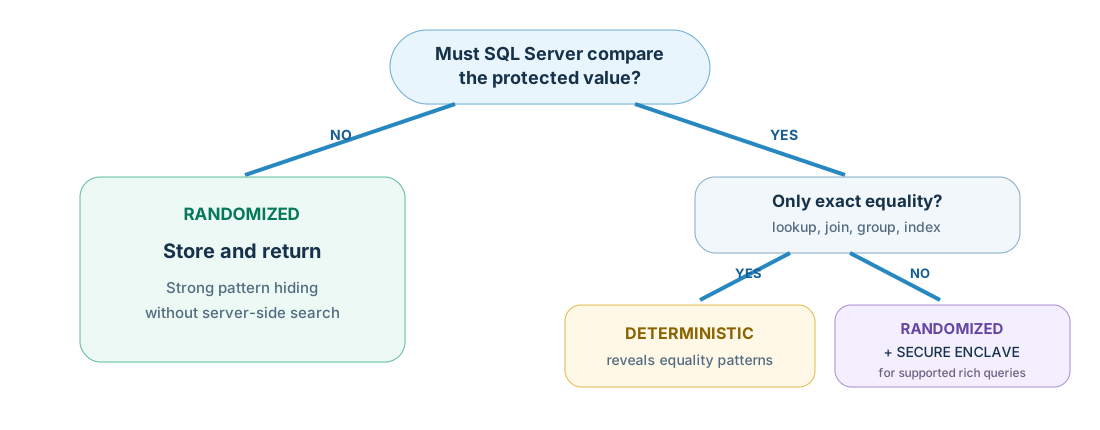
Deterministic
The same input produces the same ciphertext.
Use it for: exact lookup, equality joins, grouping, and indexing.
Trade-off: repeated values reveal equality patterns. Avoid it for small sets such as yes/no, region, or status.
Randomized
The same input normally produces different ciphertext each time.
Use it for: values that only need to be stored and returned.
Trade-off: without a secure enclave, SQL Server cannot search, join, group, or index the value.
Choose from real query patterns, not from the label that sounds safest. Changing the encryption type later means re-encrypting the column.
What changes or breaks
Always Encrypted is an application and schema project, not a transparent database switch.
- Without enclaves, randomized columns cannot participate in server-side comparisons. Deterministic columns support equality operations, not ranges or pattern matching.
- Values that touch encrypted columns must be parameters. Mixing plaintext literals with encrypted values causes an operand type clash.
FOR XML,FOR JSON, table-valued parameters targeting encrypted columns, and several data types are unsupported.- Encrypted columns cannot use features such as full-text search, sparse columns, default constraints, Dynamic Data Masking, or Change Data Capture.
- Randomized columns cannot be ordinary index keys, primary keys, unique keys, or foreign-key participants without the enclave-specific capabilities and limits Microsoft documents.
- Transactional, merge, and snapshot replication do not work on encrypted columns. Physical replication such as Always On availability groups is supported.
- Distributed queries through linked servers and cross-database joins over encrypted columns are restricted.
Read the current Microsoft limitations list before designing the schema; product capabilities change over time.
Operational costs
- Key-store availability becomes application availability. Warm driver caches help, but cold starts and key rotation still need the external store.
- Ciphertext is wider. Expect more storage and network traffic, and test indexes and memory grants.
- Client CPU rises. Encryption and decryption happen in the driver.
- Every tool needs protocol support. Reporting, export, ETL, and support tools without an enabled driver see ciphertext or fail.
- Type matching is strict.
charversusnchar, length, precision, scale, anddateversusdatetimemistakes often surface only after encryption.
Database permissions to view CMK and CEK metadata do not grant key-store access. On SQL Server, public receives both metadata-view permissions by default; Azure SQL Database differs. Review those grants, then keep key-store access with the approved application or security role.
Rotating a CMK can be relatively light because it rewraps the CEK. Rotating the CEK or changing encryption type re-encrypts data and needs a production change plan.
Where secure enclaves help
A secure enclave is a protected memory region inside the database engine process. An approved client can release a key to that region, where SQL Server performs an allowed operation on plaintext without exposing it to the rest of the engine.
For enclave-enabled randomized columns, SQL Server 2022 and Azure SQL Database can support comparisons, BETWEEN, IN, LIKE, DISTINCT, joins, sorting, grouping, and nonclustered indexes, subject to documented requirements. SQL Server 2019 has a smaller feature set: joins are limited to nested loops, and ORDER BY and GROUP BY are not supported. Rich queries require randomized encryption, and SQL Server 2022 needs database compatibility level 160 or later.
Enclaves also allow in-place encryption, decryption, and key rotation. They improve usability, but add deployment, attestation, high-availability, and threat-model decisions. Do not add them only to avoid fixing one query.
A safe rollout
- Pick one searchable column and one non-searchable column in a restored copy of production.
- List every read, write, join, export, report, and support tool that touches them.
- Choose the key store and separate database, application, and key-administration roles.
- Test drivers and exact parameter types before changing the schema.
- Measure encryption duration, log growth, row width, latency, and cold key-store access.
- Block key-store access and confirm the alert, application error, and recovery steps.
- Rehearse key rotation and application credential rotation.
- Roll out in small batches, with a tested rollback and verified backup.
The practical rule: map the queries first, choose the encryption type second, and encrypt third.
Always Encrypted is strongest when it protects a small set of truly sensitive columns and the key store belongs to a different trust boundary from the database.
Further reading
- Always Encrypted overview and limitations — Microsoft Learn
- Always Encrypted with secure enclaves — Microsoft Learn
- Always Encrypted cryptography and ciphertext size — Microsoft Learn
- Develop applications with Always Encrypted — Microsoft Learn
- Use Always Encrypted with Microsoft.Data.SqlClient — Microsoft Learn
- Configure Always Encrypted with PowerShell — Microsoft Learn
- Always Encrypted key management — Microsoft Learn
- Getting started tutorial — Microsoft Learn
Last reviewed: 1 October 2026. Validate the exact SQL Server version, database compatibility level, client driver, key-store provider, and enclave technology in a non-production environment before deployment.