
Security & recovery
Database attack surface defense
How database breaches often start with a valid login or an overprivileged app — and how to test admins, keys, copies, and restore before you need them.
A database can be encrypted and still lose data. A stolen login, an app role that can read too much, or a bulk export that nobody tracks can all look like normal work until the damage is done.
This guide is for DBAs, application owners, and security teams. It maps common ways data leaves or gets changed, what each control actually stops, and how to test recovery when production admin access is no longer trustworthy. The ideas apply across engines; examples lean on SQL Server where that helps.
Scope: defensive planning only — no exploit recipes. Study attack paths so you can harden systems you are allowed to touch.
The idea in simple terms
Think of the database as a vault with several doors. Each door is a normal business path — not a Hollywood exploit. Teams in Nepal facing residency or privacy rules can also read the Nepal: policy vs proof sidebar for local examples.
The database is a vault with many doors
Disk encryption locks the floor safe — not the person with a badge
Public or poorlyfirewalled ports
Harden
Private onlyNo internet DB
Stolen password,missing MFA
Harden
Named adminsPhish-resistant MFA
BCP, dumps,analytics sync
Harden
Dual-controlCopy register
DBA, cloud IAM,KMS, backup console
Harden
Separate planesHSM / key custody
Vendor support,CI/CD identity
Harden
Time-boxed PAMRecorded sessions
| Door | In simple words | What usually goes wrong | What “good” looks like |
|---|---|---|---|
| Front door | The network path that reaches the database | The database port is open to the Internet, or too many machines can connect | Outside tests cannot reach the database; only approved app networks can |
| Staff badge | Who is allowed to log in as a privileged user | Shared passwords, reused logins, or weak MFA — one stolen secret is enough | Each admin has their own account; phishing-resistant MFA on interactive login |
| Loading dock | How large amounts of data leave the system | Bulk exports, dumps, or analytics sync look like normal work and nobody tracks them | Big extracts need approval, a clear destination, and monitoring of unusual read volume |
| Master keys | Who can decrypt, administer, or wipe recovery | DBA, cloud IAM, KMS, and backup consoles share the same people or passwords | Production admins cannot freely change protected backups or key recovery |
| Side alley | Helpers and tools that sit outside the main app | Vendor remote support, deploy pipelines, or linked servers keep standing high access | Vendor and CI access is time-boxed, recorded, and reviewed |
1. Typical database estates
In many production environments — public sector, finance, SaaS — the layout looks like this. The picture is familiar worldwide.
Typical database estate
Disk encryption is common. Proof of who can copy, decrypt, or delete recovery is less common.
Coverage is unevenSome paths skip controls
Watch for
Know every entry pathTest from outside
App role can readalmost every table
Watch for
Least privilegePer-tenant checks
Shared loginsStanding privilege
Watch for
Named accountsTime-boxed access
Password onlyor weak MFA
Watch for
Phish-resistant MFAShort-lived sessions
Trusted by apps,ETL, and backup tools
Watch for
Private listenerScoped DB roles
Copy bad writesas well as good ones
Watch for
Use for uptimeNot sole recovery
Weaker controlson second copies
Watch for
Track every copySame privacy rules
Same admin domainas production
Watch for
Separate adminsTested restore
One admin pathor provider-only KMS
Watch for
Key recovery testedDenial tested too
| Part of the estate | In simple words | What we often see | Why it matters |
|---|---|---|---|
| Edge path | How users and attackers first reach your network | Firewall / VPN / WAF coverage is uneven; some paths are watched, others are not | If one path is open, everything behind it is easier to reach |
| Applications | The software staff and customers use every day | App accounts can read almost every table (“the app needs everything”) | A stolen app token or injection bug becomes a wide data leak |
| Admins / vendors | People who maintain the system | Shared DBA logins and standing vendor access | One compromised admin account can dump data or break recovery |
| Identity | The login system (IdP) | Passwords only, or MFA that is easy to phish | Attackers prefer stealing a valid login over breaking encryption |
| Primary database | Where the real business records live | Trusted by apps, ETL, and backup tools | Controls must sit on identity and authorization, not only on the disk |
| Replicas / HA | Standby copies for uptime | Treated as “disaster recovery” even though they copy every write | Bad or fraudulent changes land on the replica too |
| Warehouse / BI | Reporting and analytics copies | Extra copies with weaker rules and unclear owners | Sensitive rows leave the approved boundary without anyone noticing |
| Backups | Your last chance to restore | Same admins and passwords as production; restore rarely practiced | Ransomware or a bad admin can delete recovery with the same credential |
| Keys | What unlocks encrypted files and backups | One person can both run production and manage keys | Lost or stolen key access can make “immutable” backups unreadable |
Patterns to keep in mind (same themes as the table):
- Encryption at rest (TDE or volume encryption) is often already on.
- TLS is improving, but some app servers still skip certificate checks.
- Monitoring still hunts malware more than odd but legitimate data access.
2. Common gaps
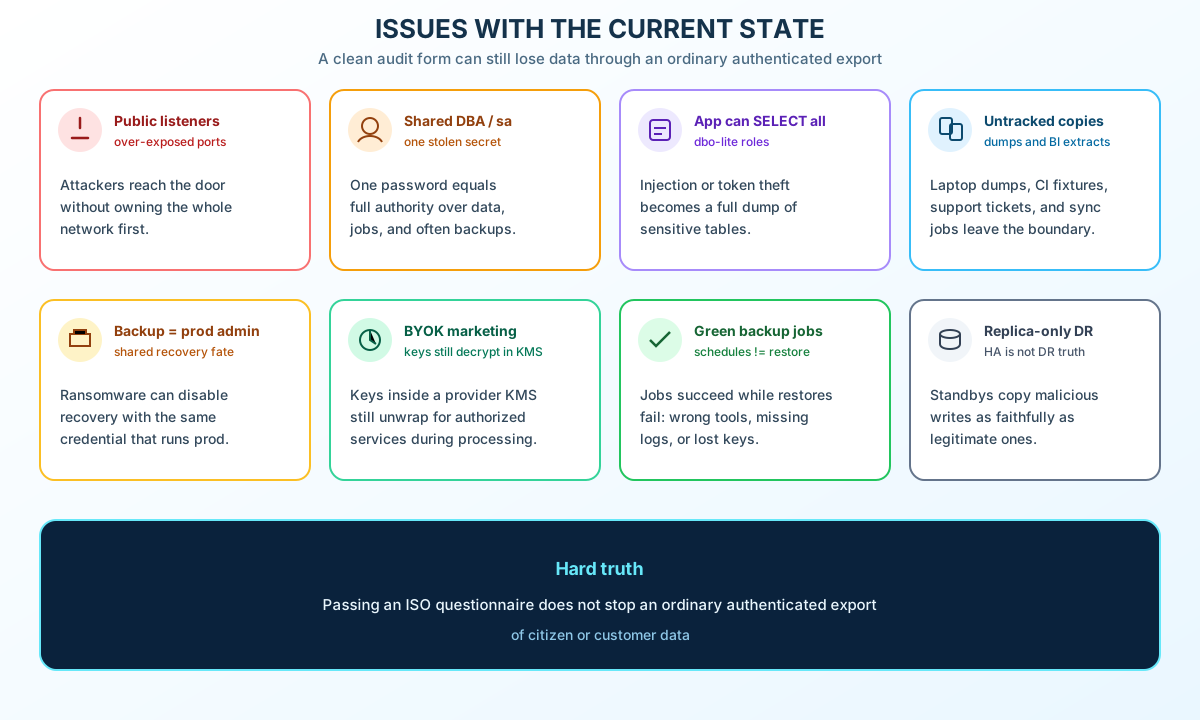
| Issue | Why it matters |
|---|---|
| Public or over-exposed listeners | Attackers can reach the engine without owning the whole network |
Shared DBA / sa-style accounts | One stolen secret can mean full authority |
App roles that can SELECT everything | Injection or token theft becomes a wide read |
| Untracked copies | Laptop dumps, CI fixtures, BI extracts, support attachments |
| Backup admins = production admins | Ransomware can disable recovery with the same credential |
| “BYOK enabled” on a slide | Keys in a provider KMS still decrypt for authorized cloud services |
| Green backup jobs | Jobs succeed while restores fail (wrong tool, missing logs, lost keys) |
| Replicas treated as the only DR | Standbys copy bad writes as faithfully as good ones; they are not a substitute for point-in-time backup |
3. Risk factors
Weakness is not one CVSS number. Use the scorecard to prioritize work — not to predict breach odds.
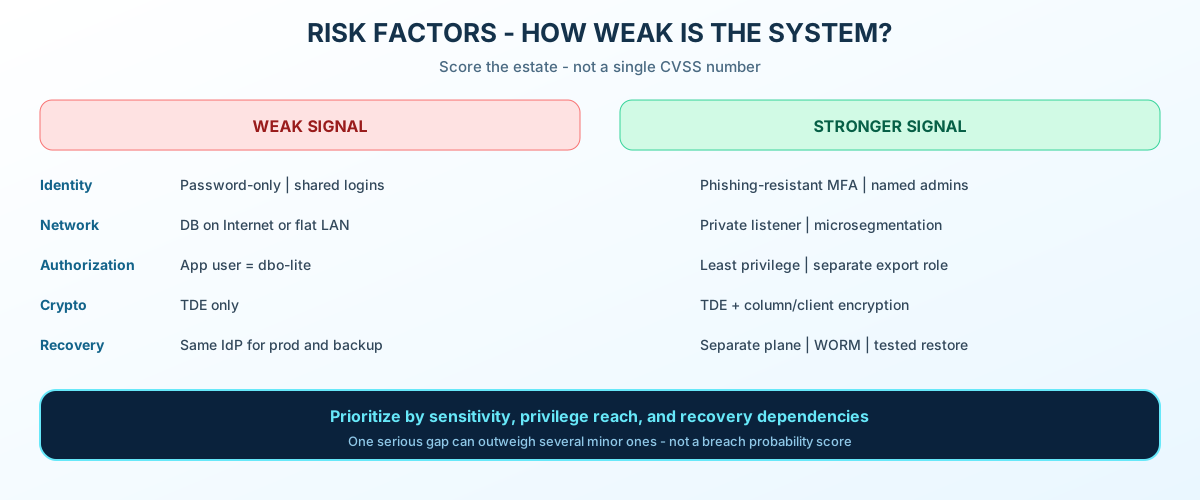
| Risk factor | Weak signal | Stronger signal |
|---|---|---|
| Identity | Password-only admins; shared logins | Phishing-resistant MFA; unique named admins |
| Network | DB reachable from Internet or flat LAN | Private listener; microsegmentation |
| Authorization | Table-level “app_user = dbo-lite” | Object/row checks; least privilege; governed export path |
| Crypto boundary | TDE only | TDE plus column/client encryption for sensitive fields |
| Copy control | Unknown ETL and “temporary” dumps | Copy register; approved bulk export with monitoring |
| Recovery | Same IdP for prod and backup | Tested independence; enforced retention; key recovery proven |
| Detection | Antivirus on the host only | Export baselines; privilege-change alerts; audit heartbeat |
| Supply chain | Standing vendor DBA access | Time-boxed PAM; recorded sessions |
Prioritization order (illustrative): privileged identity or recovery compromise → app paths that allow mass disclosure → backups sharing prod authority → unknown copies → silent row changes → unpatched engines → shared DR dependencies → lost or untested keys.
4. Attack paths (defensive catalog)
Attackers usually want one of a few outcomes: copy data, alter records, deny service, or control recovery. The paths below are categories for control design — not instructions.
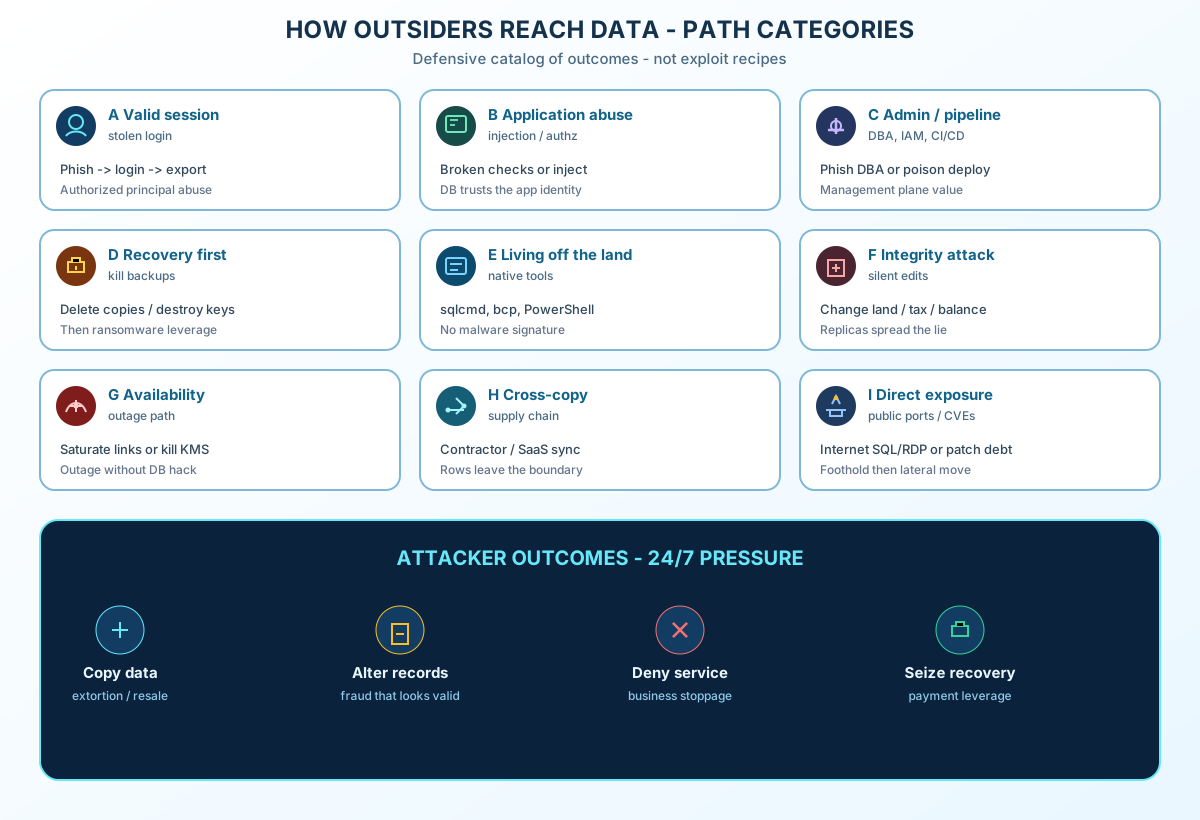
Path A — Valid session, normal features
Stolen credential → VPN or app login → Over-broad role
→ Query or export → Data leaves
Storage encryption does not help if the principal is allowed to read the data. Mandiant’s 2024 write-up of UNC5537 is a useful example for this path only: stolen customer credentials and missing customer-side controls on certain Snowflake deployments — not a claim that every cloud platform was breached.
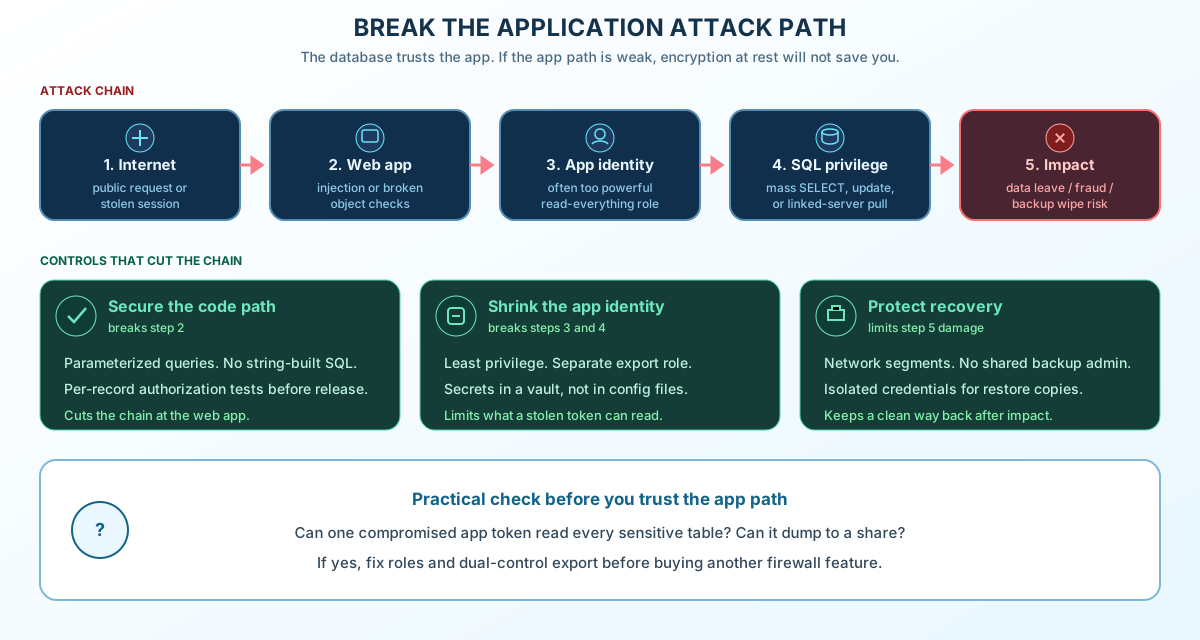
Path B — Application abuse (injection or weak object checks)
Reach app → Inject or skip authorization → Unauthorized READ/UPDATE
→ Fraudulent change replicated everywhere
Fix SQL injection and per-record authorization. A “clean” query can still exfiltrate if the app role is too wide.
Path C — Admin, vendor, or pipeline compromise
Phish DBA / steal cloud IAM / poison update → Privileged access
→ Disable audit or retention → Dump or encrypt
IdP, orchestration, backup consoles, and KMS often beat a single table CVE in impact.
Path D — Recovery targeted first
Backup-admin rights → Shorten retention / delete copies / break keys
→ Ransomware or wipe → No clean restore
Test which admin can change retention, delete protected versions, or reach encryption keys — not just whether a checkbox says “immutable.”
Path E — Living off the land
Ordinary admin tools → Native dump, replication, PowerShell, cloud CLI
→ Slow exfil to “approved” storage
Defenders hunt binaries; attackers use your sqlcmd, bcp, SSMS, pg_dump, and sync jobs.
Path F — Integrity without outage
Insider or stolen DBA → Change registry / ledger fields
→ Replication spreads the lie → Backups preserve false state
Checksums prove bytes; they do not prove a land transfer is legitimate.
Path G — Availability without engine exploit
Saturate upstream links / expensive authenticated queries / key service outage
→ App cannot connect or decrypt
Private DB listeners do not fix saturated ISP paths or KMS dependencies.
Path H — Copies and supply chain
Contractor laptop → VPN → Prod read role
  or  Analytics sink / ticket attachment / foreign SaaS sync
→ Rows leave the intended boundary
Path I — Direct exposure and patch debt
Internet-facing SQL or RDP → Credential guess or known CVE
→ foothold → lateral move toward data
Shodan-style exposure and missed engine, driver, and extension patches belong in the same program as identity work.
5. Tool categories attackers reuse
Defenders should know these classes. Legitimate staff use the same tools daily.
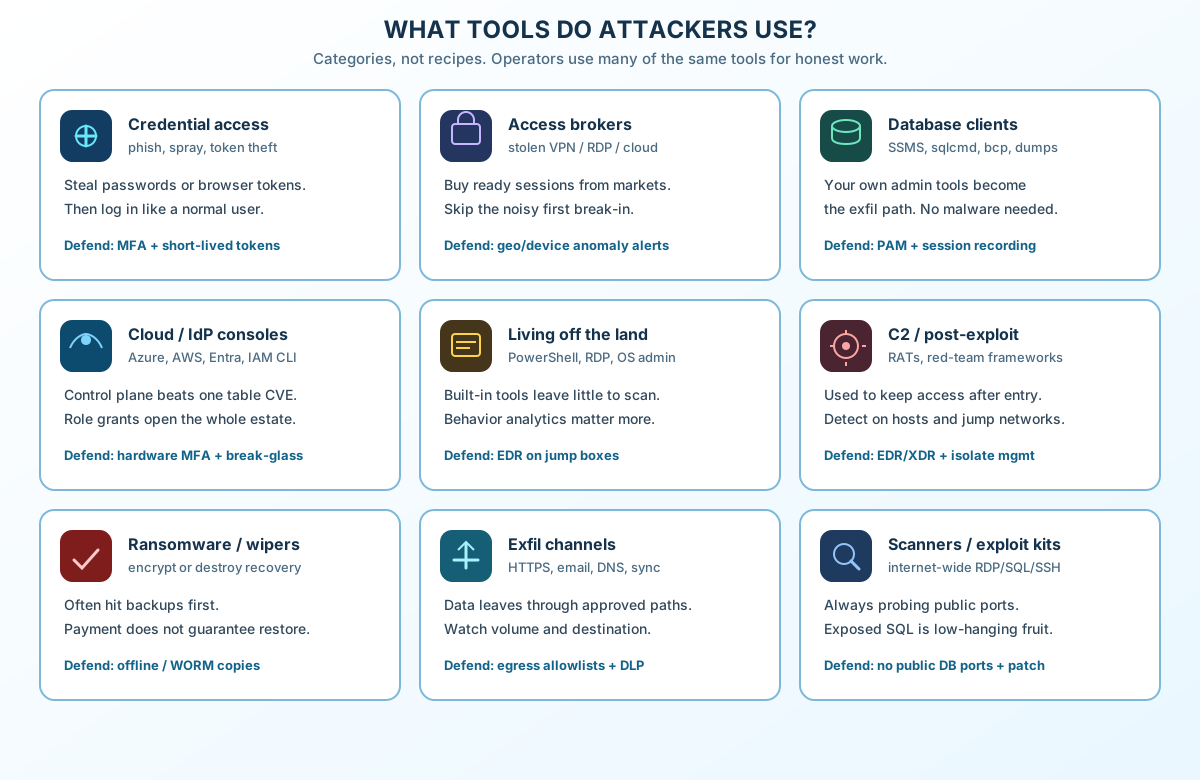
| Category | Examples of tool classes | Defensive implication |
|---|---|---|
| Credential access | Phishing, infostealers, token theft | Phishing-resistant MFA; short-lived tokens |
| Access brokers | Stolen VPN/RDP/cloud sessions | Assume reuse; device and geo anomalies |
| Database clients | SSMS, sqlcmd, bcp, JDBC/ODBC, pg_dump (legacy Azure Data Studio may still appear on old laptops — retired Feb 2026) | PAM gateways; session recording on jump hosts |
| Cloud / IdP consoles | Azure Portal, AWS Console, IAM CLI | Break-glass accounts; alert on role grants |
| Living-off-the-land | PowerShell, curl, scheduled tasks | EDR on admin boxes; script constraints |
| Ransomware / wipers | Commodity encryptors | Offline/WORM copies; clean-room restore |
| Exfil channels | HTTPS to cloud storage, sync tools | Egress rules; DLP; volume baselines |
| Scanners | Internet-wide probes for RDP/SQL | No public DB ports; patch SLAs |
6. Why suspicious activity goes unnoticed
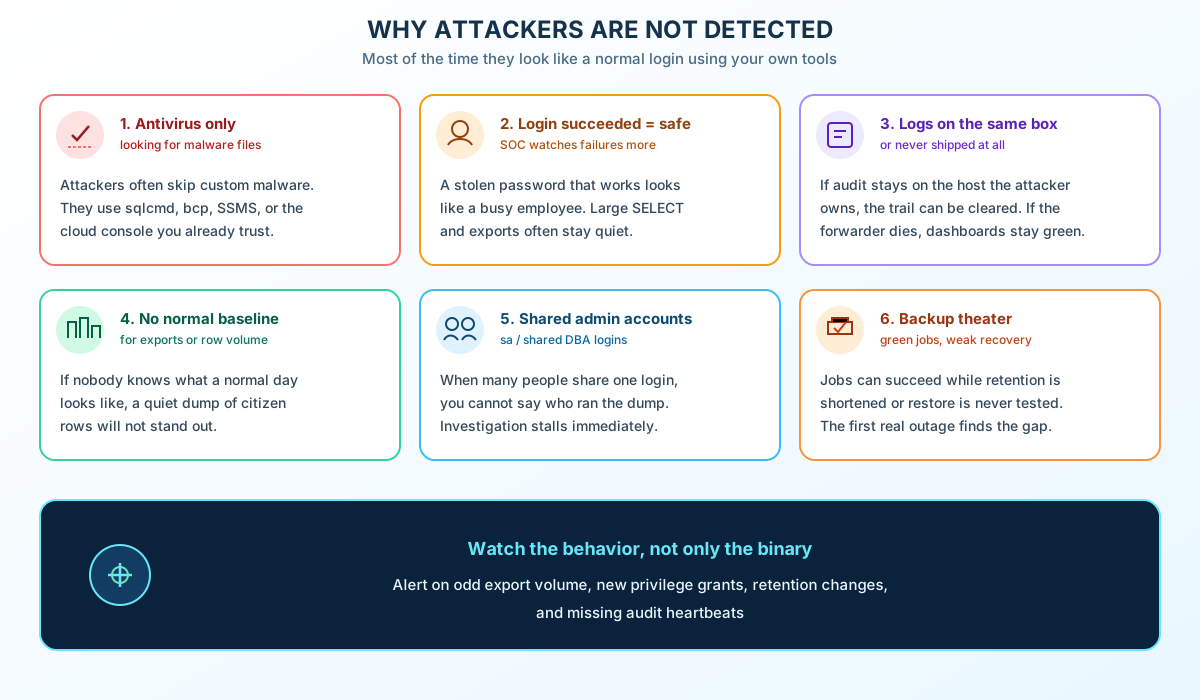
| Blind spot | What happens |
|---|---|
| Signature-only stacks | Living-off-the-land leaves little to hash |
| “Authorized = safe” | Large SELECTs and exports ignored |
| Audit on the attacked host | Logs never reach the SIEM |
| No export baseline | Nobody knows normal row/byte volume |
| Shared accounts | No attribution for sa / shared DBA |
| Silent forwarders | Dashboards stay green when shipping stops |
| Integrity gaps | Fraudulent updates look healthy |
| Backup success ≠ recovery | Retention shortened while jobs stay green |
Signals worth operationalizing — pick what your stack can actually emit; assign an owner and a test:
| Signal | Typical source | Prerequisite | Who responds | How to test |
|---|---|---|---|---|
| Privileged human login without expected MFA | IdP / PAM (not the SQL engine) | MFA enforced at IdP or gateway for interactive admin | SOC / identity team | Red-team login from new device; confirm alert |
| Unusual export or read volume | App logs, DB gateway, DAM, or storage egress | Baseline per role/service; note response_rows in SQL audit is not universal on all SQL Server editions (audit records) | SOC + app owner | Simulate large read in lower env; confirm ticket |
| New replication / linked server / dump job | SQL Agent, config tables, change tickets | Inventory of approved jobs | DBA + SOC | Create test job; must page or queue |
| Backup retention or immutability change | Backup product API / cloud audit | Separate backup admin tested | Backup owner | Attempt change with prod admin; should fail or alert |
| Audit forwarder heartbeat | Log platform | Off-host shipping | SOC | Stop forwarder deliberately; alert within SLA |
| KMS decrypt spike | Cloud audit logs | Supporting signal only — caching decouples keys from each row read | Security engineering | Compare with app export metrics, not alone |
Workload identities (services, CI jobs) do not get interactive MFA prompts. Scope their credentials, rotate often, and monitor what they can read — the same as human admins.
CISA and others document living-off-the-land persistence: hunt unusual use of legitimate admin tools, not only new malware files. See CISA advisory AA24-038A (PRC state actors, critical infrastructure) as one public example.
7. Principles that change outcomes
- Assume stolen identity — design for compromised IdP and sessions.
- Least privilege — separate app, migration, analytics, replication, backup, and security roles.
- Private data paths — authenticate every hop; no Internet-facing DB listener.
- Encrypt for the right threat — TDE is not a column trust boundary (Always Encrypted when DBAs must not see values).
- Govern copies — dumps, replicas, and warehouses are in scope.
- Recovery independence — prod compromise must not easily admin backups, keys, or offline copies (separate IdP is one pattern; test federation and shared break-glass).
- Prove restore — clean-room plus business reconciliation, not only “files restored.”
- Detect behavior — exports, grants, retention, missing audit.
- Minimize retention — less stored data means less to steal later.
- Evidence over badges — denied cross-tenant tests beat questionnaire rows.
8. Controls, detection, and recovery
8.1 First hardening moves (days, not years)
| Action | Helps with | Done when |
|---|---|---|
| Remove public database ports | Path I; reduces direct noise on G/H | External reachability test fails cleanly |
| Upstream DDoS / link capacity; query timeouts and limits | Path G saturation / expensive queries | Load test stays within SLO |
| Scoped contractor/VPN access; copy register | Path H | Contractor cannot reach prod without ticketed role |
| Phishing-resistant MFA; no shared DBA passwords | Path A/C | Interactive privileged humans covered |
| Separate backup admins from production domain | Path D | Simulated prod admin cannot change protected retention or delete locked test backup |
| Parameterized SQL; object-level authorization | Path B | Tenant A cannot read/update tenant B via app |
| Governed bulk export (see below) | Path A/E | Bulk path needs approval; reads monitored |
| Ship audit off-host with heartbeat | Detection | Deliberate forwarder stop pages SOC |
| Patch engines, drivers, backup agents, admin tools | Path I | SLA met for critical CVEs |
| Clean-room restore drill | All recovery paths | Timed RTO/RPO + reconciliation signed |
Bulk export and “dual control”: approving an export workflow does not stop someone with broad SELECT from copying data row by row. A workable design combines:
- Application identities scoped to records/columns they need
- A separate export service or role for large extracts
- Approval tied to dataset, purpose, and destination
- Time-limited grants where possible
- Monitoring of cumulative read volume per identity
Dual approval is one layer in that stack — not a magic database permission.
8.2 Encryption — pick the layer
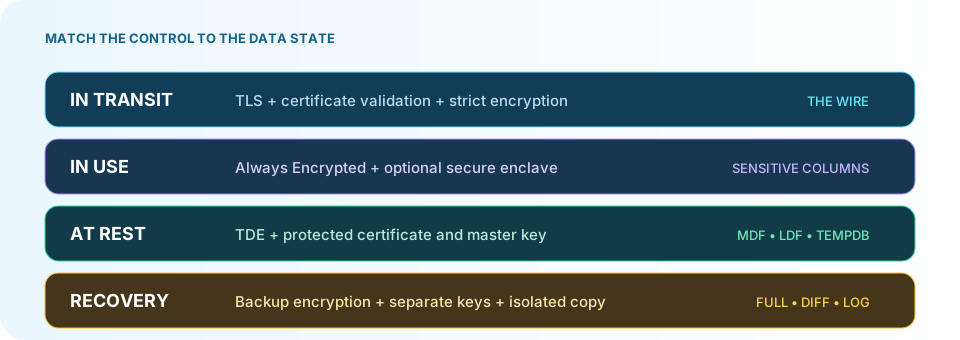
| Control | Protects / enables | Does not replace |
|---|---|---|
| TDE (SQL Server) | Data files and TDE-protected database backups at rest (TDE) | Authorized SQL session; remember cert/EKM recovery on restore |
| Volume encryption | Stolen disk / copied volume offline | Authorized session; a copied .mdf out of band may lack the same wrapper |
| TLS 1.2+ with valid cert chain | Wire sniffing on the path | Stolen credentials; avoid TrustServerCertificate=true in production (SqlClient) |
| Always Encrypted | Operators/DBAs reading selected columns without key access | Attacker with approved app and key access |
| Always Encrypted with enclaves | Server-side operations on protected columns inside an attested enclave (trust the enclave model) | Malicious logic in an approved client |
| External / BYOK keys in cloud KMS | Customer custody and authorization over key use | Automatic provider exclusion — authorized services may still receive plaintext key material (AWS external key stores) |
| Client-side / app-layer field encryption | Plaintext only where you run crypto | Compromised app host or key in config |
| Dynamic data masking | Casual over-read in some UIs | Users who can run ad hoc queries may infer values (DDM) |
Practical SQL Server pairing: TDE for files/backups at rest; Always Encrypted for national IDs, cards, salaries; app authorization + MFA so the client is not a firehose.
8.3 Buying tools (against a failure scenario)
| Layer | Candidate classes | Role |
|---|---|---|
| Edge / DDoS | Cloudflare, Akamai, carrier scrubbing | Path G upstream |
| NGFW / WAF | Palo Alto, Fortinet, F5 | Segment — not safe SQL by itself |
| IAM / PAM | Entra ID, CyberArk, Delinea, Teleport | Named, time-limited privilege |
| EDR / XDR | Defender, CrowdStrike, SentinelOne | Admin jump boxes |
| SIEM / SOAR | Sentinel, Splunk, Wazuh | Correlate exports, grants, log loss |
| DAM / native audit | Guardium, SQL Audit, pgAudit | Visibility — fix authz too |
| Backup + object lock | Veeam, Rubrik, S3 Object Lock | Retention vs readable recovery are different (Object Lock) |
| Keys / HSM | Key Vault, Managed HSM, Vault | Test denial and recovery |
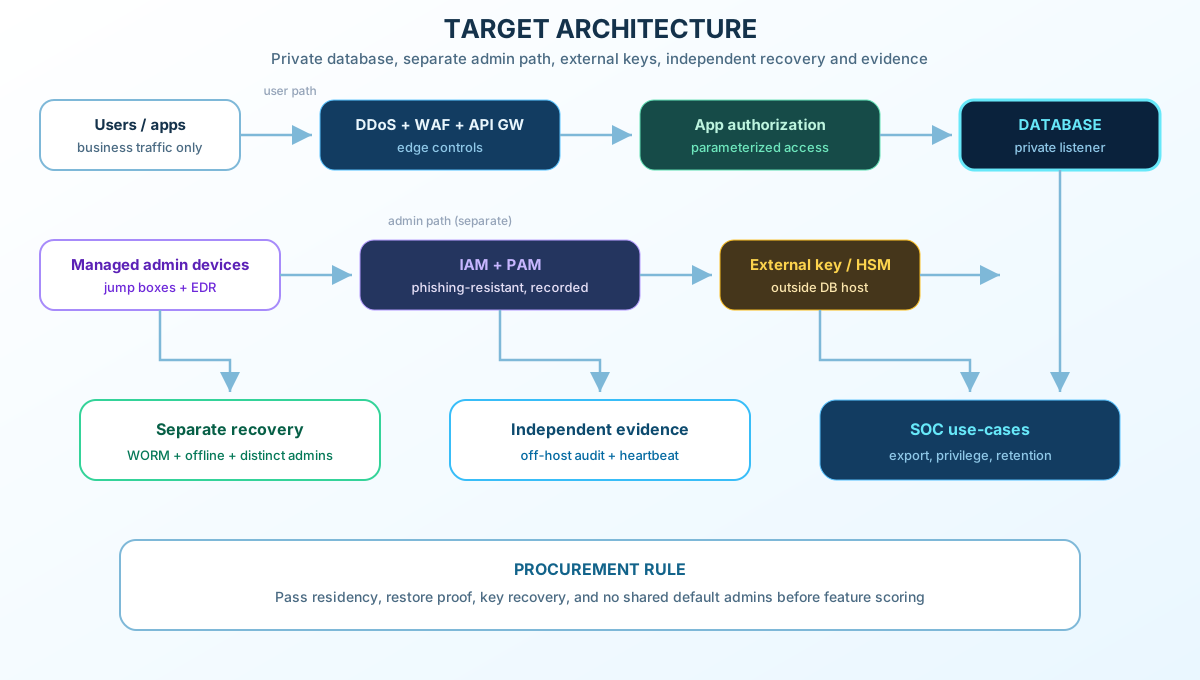
Pass/fail on restore proof, key recovery, and no shared default admins before feature scoring.
8.4 Target architecture (trust boundaries)
In words:
- Users and apps terminate TLS at the app tier; apps use scoped DB identities — not admin shared logins.
- Administrators reach databases only through PAM/jump hosts with session recording; MFA is enforced at the IdP/gateway for humans.
- The database listener sits on a private network segment — not the public Internet.
- Keys live in a service the DBA cannot arbitrarily export; app and DBA key use are separated.
- Backups and object-lock storage use different admin credentials and runbooks than production; offline or compliance-mode retention is tested against a simulated prod admin.
- Audit and alerts land in a SIEM the database team cannot silently delete; heartbeats are monitored.
- SOC owns playbooks for export spikes, grant changes, retention edits, and forwarder loss.
8.5 Detection use-cases (summary)
Use the signal table in section 6. Add correlation: a KMS spike plus a new linked server plus a backup retention change on the same timeline is more interesting than any one event alone.
8.6 Recovery that matches the harm
| Harm | Response focus |
|---|---|
| Data copied | Revoke access; preserve evidence; notify as required — restore does not recall copies |
| Data altered | Incident command decides write suspension per service; compare trusted history; reconcile later legitimate events |
| Ransomware / wipe | Clean-room restore from independent copies; investigate possible theft; do not assume exfil until evidence says so |
| Keys lost | Recover key custody before bulk restore; protected objects may exist but be unreadable |
| Site / power / ISP loss | Failover with fencing; shared power/ISP/admin domain is not independence |
Example recovery drill (illustrative RPO 4 hours, RTO 8 hours — set your own):
- Charter: name the business service, owners, RPO/RTO, and the ledger/registry/source used to reconcile truth.
- Assume prod admin is untrusted: stand up a clean-room host/network; use recovery runbooks and keys that prod admin cannot reach.
- Pick a recovery point from evidence — last green backup job is a candidate, not proof of good data.
- Restore full/diff/log chain (or platform equivalent), keys, and app config; confirm retention covers the scenario.
- Validate twice: DB consistency checks and business reconciliation against independent records.
- Re-enter safely: remove the abuse path, rotate secrets, confirm monitoring, get business sign-off before cutover.
- Retrospective: record actual RTO/RPO, blockers, and owners for fixes.
Preserve forensic artifacts where you can before destructive steps. For ransomware, follow your incident plan (CISA ransomware guide, NIST SP 800-61 Rev. 3).
GitLab’s 2017 database outage postmortem is a sobering reminder: backup existence ≠ tested restore path — worth reading before you trust a green dashboard (GitLab incident).
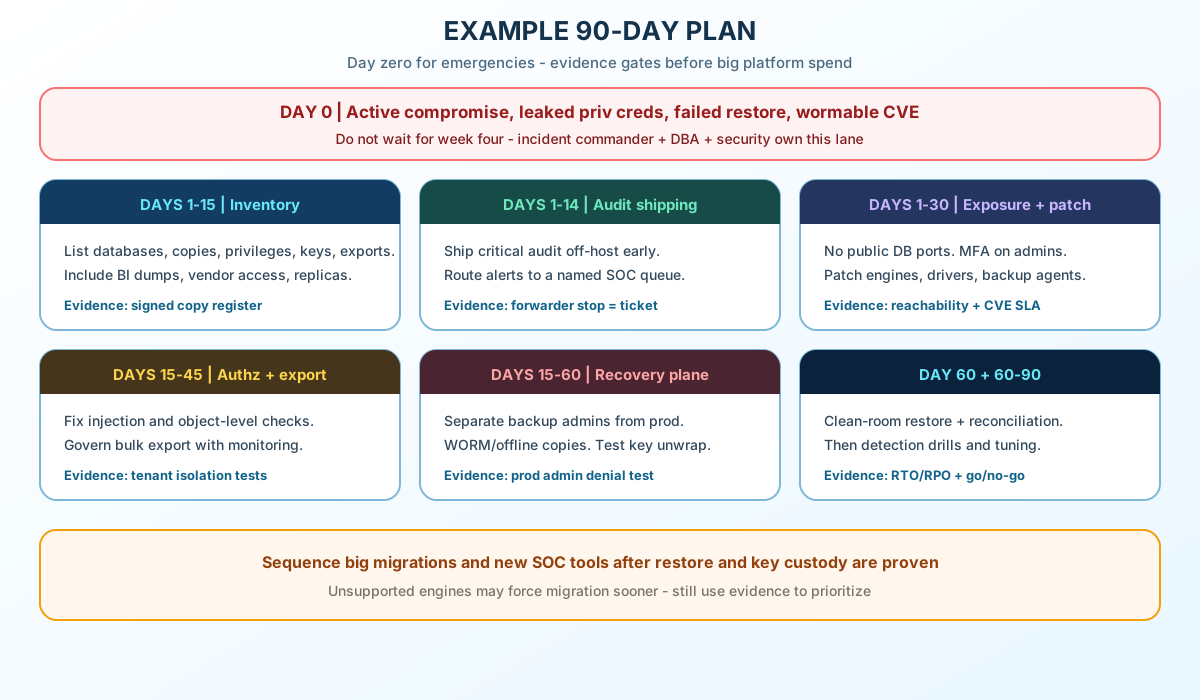
9. Example 90-day plan
Ninety days is a sample cadence. Critical services may need faster gates; lower tiers can stretch. If you already have active compromise, exposed break-glass passwords, broken backups, or a wormable CVE — treat that as day zero, not “week four.”
| Window | Work | Owner (example) | Evidence |
|---|---|---|---|
| Day 0 | Active incident, leaked priv creds, failed restore test, emergency patch | Incident commander + DBA + security | Ticket / war-room record; patch or containment proof |
| Days 1–15 | Inventory DBs, copies, privileges, keys, exports | DBA + app owners | Signed copy register |
| Days 1–14 | Ship critical audit off-host; route alerts to a named queue | SOC + DBA | Deliberate forwarder stop creates ticket |
| Days 1–30 | Close public exposure; MFA; end shared admins | Identity + network | Reachability + privilege report |
| Days 1–30 | Patch engines, drivers, backup agents, admin tools | DBA + ops | SLA report for critical CVEs |
| Days 15–45 | Fix injection/authz; governed bulk export | App owner + DBA | Tenant isolation negative tests |
| Days 15–60 | Separate backup plane; WORM/offline; key recovery test | Backup + security | Prod admin cannot break protected retention |
| Day 60 | Clean-room restore + business reconciliation | DBA + business owner | Timed RTO/RPO sign-off |
| Days 60–90 | Detection exercises; tune noisy rules; risk review | SOC + leadership | Go / no-go for larger projects |
| Control | Accountable role | Evidence of success |
|---|---|---|
| Scoped data access | Application owner | Tenant A cannot get tenant B’s rows via supported app paths |
| Recovery independence | Backup / security | Prod admin cannot change protected retention or required recovery keys |
| Audit health | SOC | Broken test feed alerts the on-call responder |
| Recoverability | DBA + business owner | Isolated restore meets targets and passes reconciliation |
Plan IdP and network changes with dependency checks and a rollback path — security work should not cause avoidable outages.
Large rebuilds, new SOC platforms, or engine migrations can still be right — after exposure, MFA, backup separation, and a restore drill show where the real gaps are. An unsupported database version may force migration; sequence by risk, not by slide deck.
10. Myths
| Myth | Reality |
|---|---|
| “TDE means we’re safe” | TDE does not block authorized queries |
| “BYOK means the cloud never sees plaintext” | Authorized services may still use keys per KMS design; BYOK is custody/authorization, not automatic exclusion |
| “Replicas are our DR” | Replicas mirror writes — good for availability, not a substitute for point-in-time backup |
| “Backups are immutable” | Test retention modes, key access, and admin paths — objects can remain while keys are gone |
| “The firewall handles it” | Stolen credentials ride allowed paths |
| “No alerts means no breach” | Living-off-the-land can be quiet |
| “In-country hosting = sovereign” | Location helps, but without admin, key, and copy control it is incomplete — see Nepal: policy vs proof |
Closing checklist
Use this as a short pass/fail list. For Nepal-specific evidence language (residency, citizen data, procurement), see Nepal: policy vs proof.
| # | Check | Pass when |
|---|---|---|
| 01 | No public database listener | Outside tests cannot reach production database ports |
| 02 | Named admins + MFA | Each privileged person has their own account; phishing-resistant MFA at the IdP or gateway |
| 03 | Governed exports | Bulk extracts need approval and monitoring; app roles only see what they need |
| 04 | Right crypto layer | TDE (or equivalent) for files/backups; column or app encryption where DBAs must not see values |
| 05 | Recovery independence | A simulated production admin cannot change protected retention or required recovery keys |
| 06 | Off-host audit | Stopping the log forwarder creates an alert to a named owner |
| 07 | Proven restore | Clean-room restore + business check within your policy window (for example 90 days) |
| 08 | Actionable alerts | Unusual exports, privilege grants, and retention changes reach someone who can act |
Strong database defense is identity + authorization + crypto boundaries + governed copies + independent recovery + behavior detection, checked with exercises — so data stays with the people and institutions it belongs to, not whoever holds the next valid-looking session.
Related: Always Encrypted in SQL Server · SQL Server ransomware defense · Nepal: policy vs proof
Nepal: policy vs proof
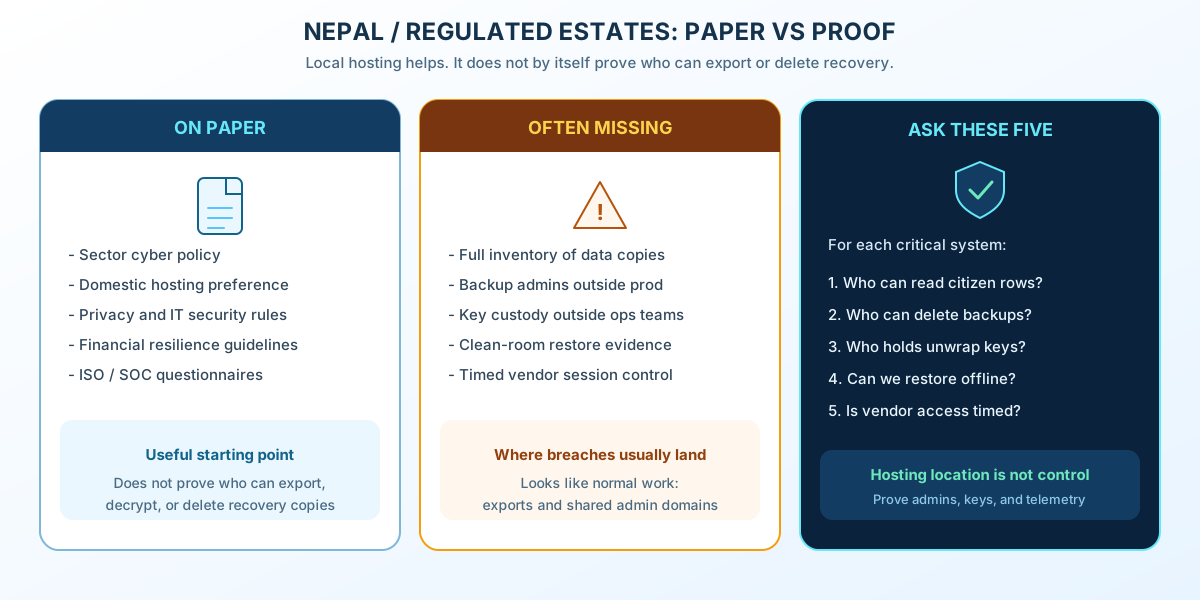
This sidebar is for operators and procurement teams in Nepal. The rest of the article is global; use this section when privacy, cybersecurity, data residency, or financial resilience expectations apply locally.
Policies on paper are a start. Auditors and citizens care about proof: an up-to-date copy inventory, independent backup access, control of encryption keys, and a restore that worked in a clean room. The same doors in The idea in simple terms and the same estate parts in Typical database estates still apply — location alone does not close them.
Practical checks for operators and procurement:
- Location is not custody. A server in Kathmandu still leaks if a vendor session or shared DBA password can export or delete recovery.
- Outages erode trust quickly. Trading or citizen-facing downtime becomes a confidence problem — restore success alone does not answer whether rows were copied or altered.
- Questionnaire rows ≠ denied export. ISO-style checklists do not replace a test where tenant A cannot read tenant B.
- Spend follows evidence. National platform rebuilds, engine swaps “for security,” or new SOC tools wait behind public listener removal, MFA, backup separation, and a restore drill — unless law or unsupported software forces a faster migration.
- Privacy is concrete. National IDs, tax and land fields, and health-adjacent data belong in scoped apps — not on contractor laptops or untracked BI dumps.
When you write acceptance criteria for a Nepal-hosted system, reuse the closing checklist and ask for the same evidence: denied cross-tenant reads, admin-delete denial on locked backups, and a signed restore drill.
Learning resources (defenders)
Use ethical-hacking and secure-development material to build detection and authorization tests in environments you own or have written permission to test.
| Resource | What defenders learn | Link |
|---|---|---|
| OWASP WSTG & cheat sheets | Injection, access control, SQL hygiene | WSTG · SQL Injection Prevention · Database Security |
| PortSwigger Web Security Academy | Hands-on injection and auth labs | portswigger.net/web-security |
| TryHackMe | Blue-team oriented paths | tryhackme.com |
| Hack The Box Academy | Guided modules on authorized targets | academy.hackthebox.com |
| MITRE ATT&CK | Map behaviors to detection | attack.mitre.org |
| Microsoft Learn | TDE, Always Encrypted, SQL security | Always Encrypted · TDE |
| NIST SP 800-61 Rev. 3 | Incident response | csrc.nist.gov |
Sources
Each link supports specific claims in this article: